> ## Documentation Index
> Fetch the complete documentation index at: https://yuno-3979e326-2026-05-13-universal-sdk-proposal.mintlify.site/llms.txt
> Use this file to discover all available pages before exploring further.
# Click to Pay
Click to Pay (C2P) is a unified checkout solution supporting Visa, Mastercard, Amex, and Discover. It's based on the EMVCo secure payment standard, eliminating manual card entry by storing tokenized cards in a network-level profile accessible across participating merchants.
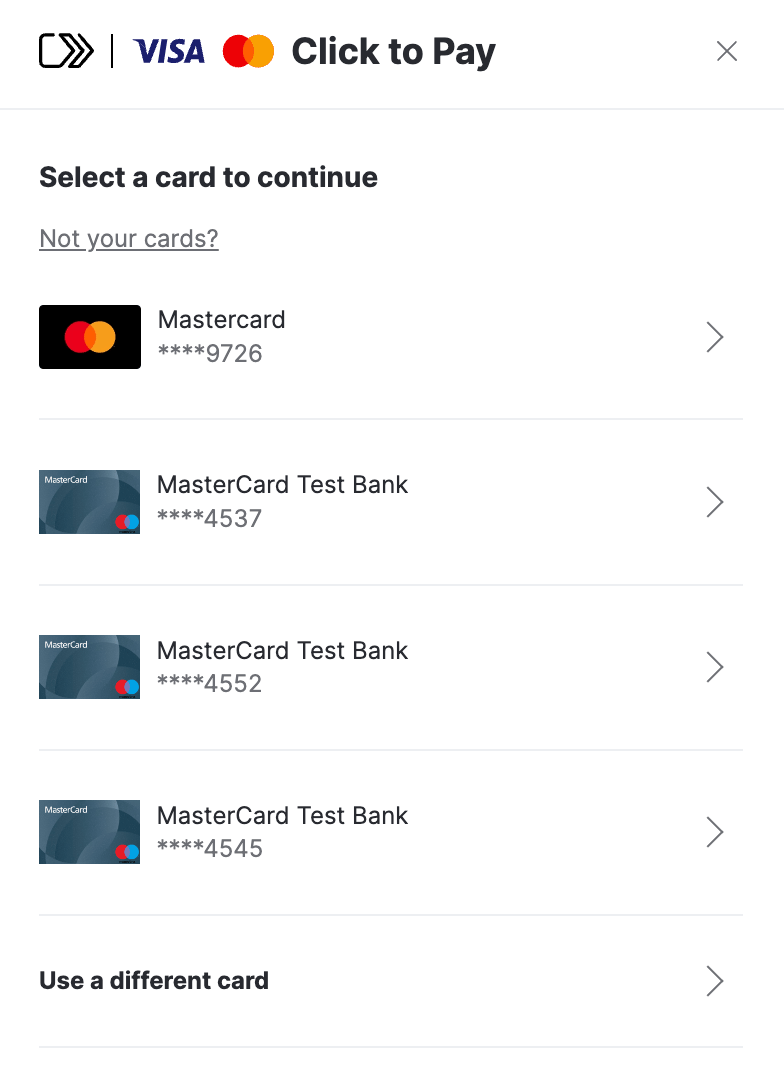 The C2P profiles of users are based on their phone number or email address (or both). Hence, Click to Pay works best for merchants with guest checkout flows. When combined with [Passkeys](/docs/payment-features/network-token-authentication), authentication becomes biometric (Face ID, Touch ID, PIN), replacing passwords and OTPs entirely.
Each card brand independently decides which countries they enable Click to Pay in. The brand availability limits which card brands a new user can add during their first enrollment.
### Mastercard — 45 countries
| Region | Countries |
| :----------------------- | :---------------------------------------------------------------------------------------------------------------------------------------------------------------------------------------- |
| **North America** | Canada, United States |
| **Europe** | Austria, Belgium, Czech Republic, Denmark, Finland, France, Germany, Ireland, Italy, Netherlands, Norway, Poland, Portugal, Slovakia, Spain, Sweden, Switzerland, Ukraine, United Kingdom |
| **Latin America** | Argentina, Brazil, Chile, Colombia, Mexico, Peru |
| **Asia Pacific** | Australia, Hong Kong, Malaysia, New Zealand, Pakistan, Philippines, Singapore, Thailand |
| **Middle East & Africa** | Bahrain, Egypt, Kuwait, Nigeria, Qatar, Saudi Arabia, South Africa, Tanzania, UAE |
### Visa — \~50 countries
| Region | Countries |
| :----------------------- | :-------------------------------------------------------------------------------------------------------------------------------------------------------------------------------------------------------------------------------------------------------------------------------------------------------------- |
| **North America** | Canada, United States |
| **Europe** | Austria, Belgium, Bulgaria, Croatia, Cyprus, Czech Republic, Denmark, Estonia, Finland, France, Germany, Greece, Hungary, Ireland, Italy, Latvia, Lithuania, Luxembourg, Malta, Netherlands, Norway, Poland, Portugal, Romania, Serbia, Slovakia, Slovenia, Spain, Sweden, Switzerland, Ukraine, United Kingdom |
| **Latin America** | Argentina, Brazil, Chile, Colombia, Mexico, Peru |
| **Asia Pacific** | Hong Kong, India, Malaysia, New Zealand, Pakistan, Singapore, South Korea |
| **Middle East & Africa** | Bahrain, Kuwait, Oman, Qatar, South Africa, UAE |
### Quick Reference: Brands Available by Key Market
| Market | Visa | Mastercard | Amex | Discover |
| :----------------- | :--: | :--------: | :--: | :------: |
| **United States** | Yes | Yes | Yes | Yes |
| **Canada** | Yes | Yes | Yes | No |
| **United Kingdom** | Yes | Yes | Yes | No |
| **France** | Yes | Yes | No | No |
| **Germany** | Yes | Yes | No | No |
| **Italy** | Yes | Yes | No | No |
| **Mexico** | Yes | Yes | Yes | No |
| **Brazil** | Yes | Yes | No | No |
| **Australia** | No | Yes | Yes | No |
| **Singapore** | Yes | Yes | Yes | No |
| **Hong Kong** | Yes | Yes | Yes | No |
**Regional Reach**
* **American Express**: 8 countries (US, CA, UK, AU, NZ, HK, SG, MX).
* **Discover**: United States only.
### Visa Issuer Mandates
Issuers in specific regions are required to support Click to Pay according to the following schedule:
* **Phase 1 (Apr 2024)**: Austria, Netherlands, Switzerland.
* **Phase 2 (Oct 2024)**: UK, Bulgaria, Croatia, Cyprus, Czech Republic, France, Greece, Hungary, Italy, Malta, Romania, Slovenia.
* **Phase 3 (Apr 2025)**: Bahrain, Kuwait, Oman, Qatar, Ukraine, UAE.
* **Phase 4 (Oct 2026)**: South Africa.
## Key features and benefits
* **Ease of Use**: It enables consumers to make online purchases with a single click, eliminating the need to enter credit card details for each purchase manually.
* **Enhanced Security**: Utilizes modern authentication standards to minimize fraud risk. This includes network-level tokenization and biometric authentication.
* **Consistent Experience**: Offers a similar payment experience across all websites that support this technology.
* **Conversion Uplift**: 4-5% conversion uplift when used with passkeys and up to 2.5x fraud reduction vs. OTP authentication.
* **Liability Shift**: Available when combining tokenization with passkeys.
**Network Tokens Requirement**
Network tokens support is required for Click to Pay in all flows (Golden Flow and APM, both with and without passkeys). Merchants must configure network tokens in their **Routing** rules to ensure successful processing.
## Integration
To integrate and start offering Click to Pay to your customers, follow these 4 simple steps:
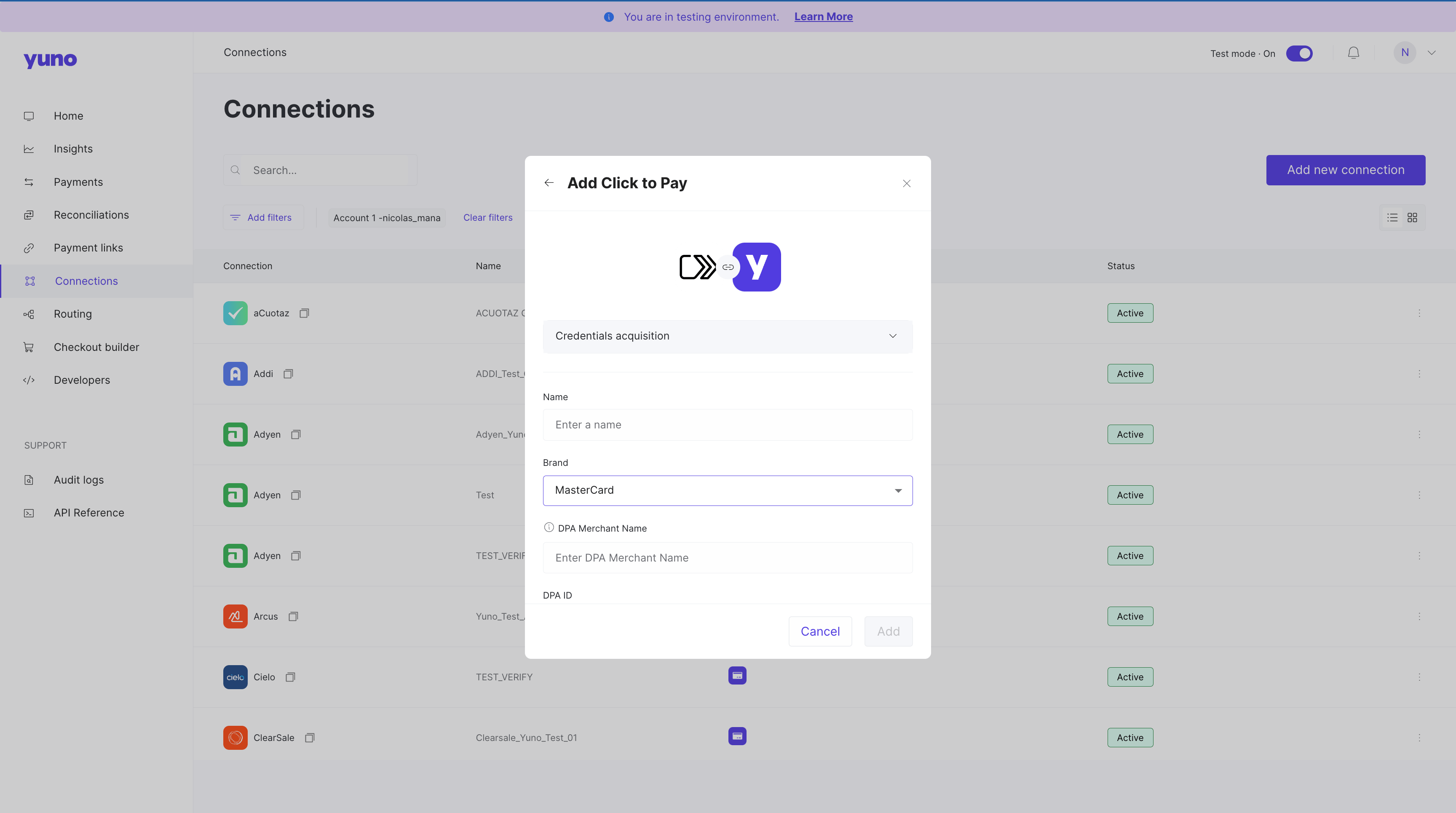
1. Create a [connection](https://dashboard.y.uno/connections) in the Yuno dashboard using your Click to Pay credentials.
The C2P profiles of users are based on their phone number or email address (or both). Hence, Click to Pay works best for merchants with guest checkout flows. When combined with [Passkeys](/docs/payment-features/network-token-authentication), authentication becomes biometric (Face ID, Touch ID, PIN), replacing passwords and OTPs entirely.
Each card brand independently decides which countries they enable Click to Pay in. The brand availability limits which card brands a new user can add during their first enrollment.
### Mastercard — 45 countries
| Region | Countries |
| :----------------------- | :---------------------------------------------------------------------------------------------------------------------------------------------------------------------------------------- |
| **North America** | Canada, United States |
| **Europe** | Austria, Belgium, Czech Republic, Denmark, Finland, France, Germany, Ireland, Italy, Netherlands, Norway, Poland, Portugal, Slovakia, Spain, Sweden, Switzerland, Ukraine, United Kingdom |
| **Latin America** | Argentina, Brazil, Chile, Colombia, Mexico, Peru |
| **Asia Pacific** | Australia, Hong Kong, Malaysia, New Zealand, Pakistan, Philippines, Singapore, Thailand |
| **Middle East & Africa** | Bahrain, Egypt, Kuwait, Nigeria, Qatar, Saudi Arabia, South Africa, Tanzania, UAE |
### Visa — \~50 countries
| Region | Countries |
| :----------------------- | :-------------------------------------------------------------------------------------------------------------------------------------------------------------------------------------------------------------------------------------------------------------------------------------------------------------- |
| **North America** | Canada, United States |
| **Europe** | Austria, Belgium, Bulgaria, Croatia, Cyprus, Czech Republic, Denmark, Estonia, Finland, France, Germany, Greece, Hungary, Ireland, Italy, Latvia, Lithuania, Luxembourg, Malta, Netherlands, Norway, Poland, Portugal, Romania, Serbia, Slovakia, Slovenia, Spain, Sweden, Switzerland, Ukraine, United Kingdom |
| **Latin America** | Argentina, Brazil, Chile, Colombia, Mexico, Peru |
| **Asia Pacific** | Hong Kong, India, Malaysia, New Zealand, Pakistan, Singapore, South Korea |
| **Middle East & Africa** | Bahrain, Kuwait, Oman, Qatar, South Africa, UAE |
### Quick Reference: Brands Available by Key Market
| Market | Visa | Mastercard | Amex | Discover |
| :----------------- | :--: | :--------: | :--: | :------: |
| **United States** | Yes | Yes | Yes | Yes |
| **Canada** | Yes | Yes | Yes | No |
| **United Kingdom** | Yes | Yes | Yes | No |
| **France** | Yes | Yes | No | No |
| **Germany** | Yes | Yes | No | No |
| **Italy** | Yes | Yes | No | No |
| **Mexico** | Yes | Yes | Yes | No |
| **Brazil** | Yes | Yes | No | No |
| **Australia** | No | Yes | Yes | No |
| **Singapore** | Yes | Yes | Yes | No |
| **Hong Kong** | Yes | Yes | Yes | No |
**Regional Reach**
* **American Express**: 8 countries (US, CA, UK, AU, NZ, HK, SG, MX).
* **Discover**: United States only.
### Visa Issuer Mandates
Issuers in specific regions are required to support Click to Pay according to the following schedule:
* **Phase 1 (Apr 2024)**: Austria, Netherlands, Switzerland.
* **Phase 2 (Oct 2024)**: UK, Bulgaria, Croatia, Cyprus, Czech Republic, France, Greece, Hungary, Italy, Malta, Romania, Slovenia.
* **Phase 3 (Apr 2025)**: Bahrain, Kuwait, Oman, Qatar, Ukraine, UAE.
* **Phase 4 (Oct 2026)**: South Africa.
## Key features and benefits
* **Ease of Use**: It enables consumers to make online purchases with a single click, eliminating the need to enter credit card details for each purchase manually.
* **Enhanced Security**: Utilizes modern authentication standards to minimize fraud risk. This includes network-level tokenization and biometric authentication.
* **Consistent Experience**: Offers a similar payment experience across all websites that support this technology.
* **Conversion Uplift**: 4-5% conversion uplift when used with passkeys and up to 2.5x fraud reduction vs. OTP authentication.
* **Liability Shift**: Available when combining tokenization with passkeys.
**Network Tokens Requirement**
Network tokens support is required for Click to Pay in all flows (Golden Flow and APM, both with and without passkeys). Merchants must configure network tokens in their **Routing** rules to ensure successful processing.
## Integration
To integrate and start offering Click to Pay to your customers, follow these 4 simple steps:
1. Create a [connection](https://dashboard.y.uno/connections) in the Yuno dashboard using your Click to Pay credentials.
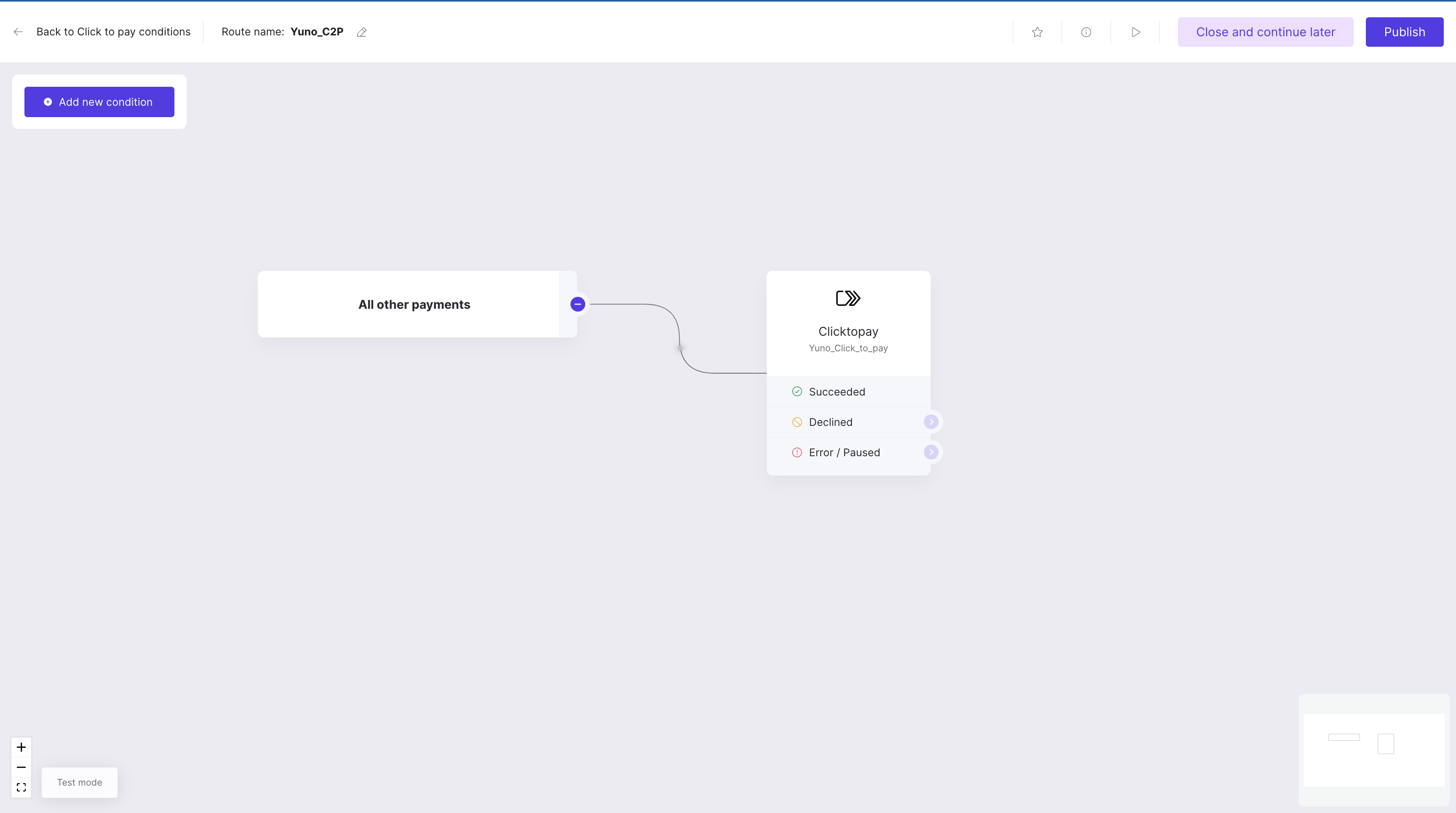
 2. Define the payment method route in the [Routing](https://dashboard.y.uno/routing) section in order to be able to enable it in the Checkout Builder.
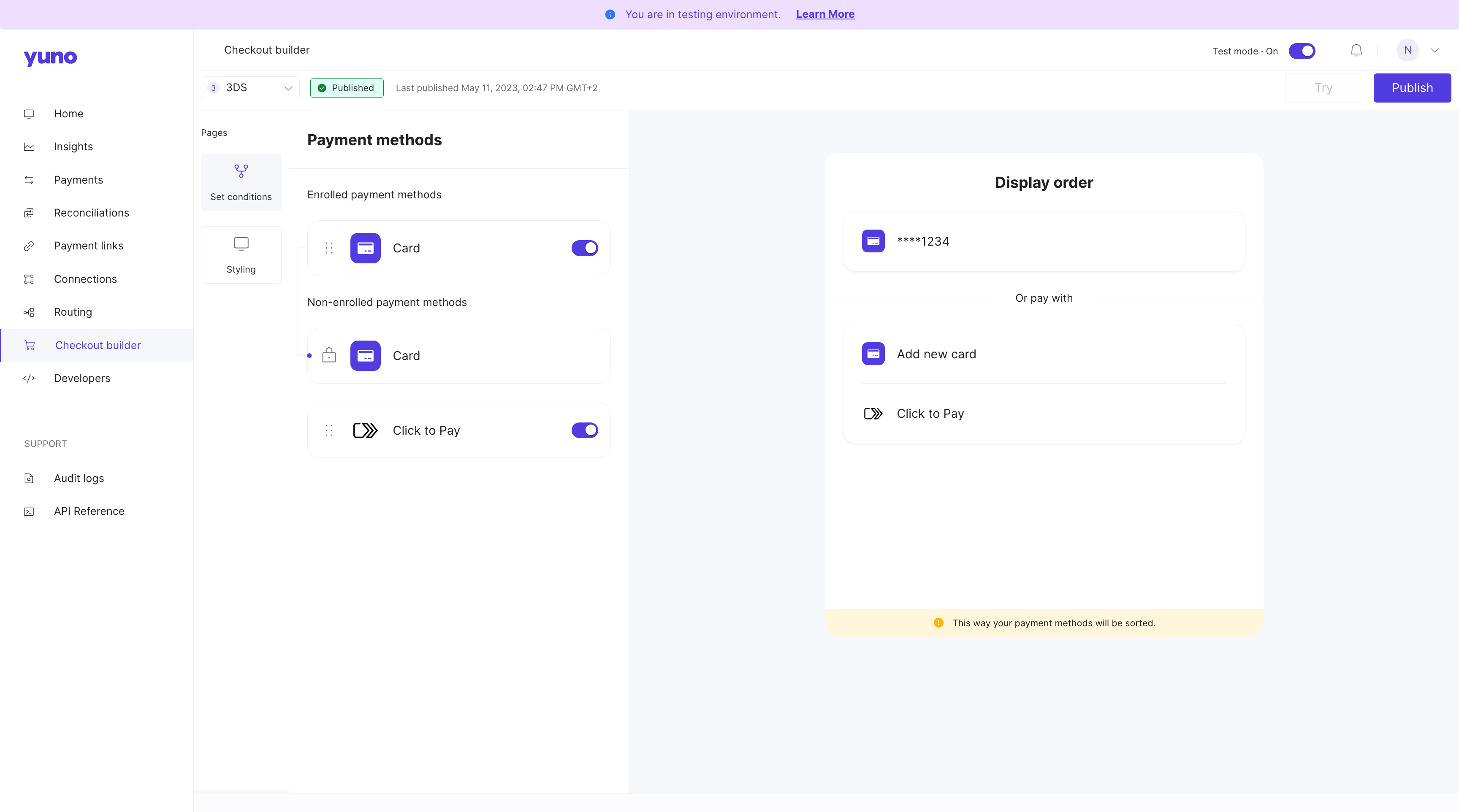
 3. Enable Click to Pay in the [Checkout builder](https://dashboard.y.uno/checkout-builder).
 4. Define the Card route: Taking in consideration that Click to Pay is a wallet that stores credit card information, the **route** where you will need to define the providers for each scenario is the same as the **'Card' payment method**.
## Checkout Flows
Merchants can choose how Click to Pay appears at checkout. Both experiences support passkeys across web and mobile platforms.
### 1. Standalone Payment Method (APM Flow)
Click to Pay appears as a separate payment button alongside cards and other methods.
* **Mandatory Enrollment**: Account creation is mandatory for all users.
* **Payload Requirement**: Requires a C2P-specific payload.
* **Visibility**: Best for merchants who want Click to Pay prominently featured.
### 2. Embedded in Card (Golden Flow)
Click to Pay is embedded within the card payment method and is invisible until the user selects "Card."
* **Optional Enrollment**: Enrollment is via a checkbox. If declined, the user proceeds with manual card entry (the transaction still shows `CLICK_TO_PAY` in the one-time token (OTT)).
* **Visibility**: Best for low-friction UX where enrollment feels optional.
**Certification Note**
The golden flow with passkeys in Mobile is currently in certification.
4. Define the Card route: Taking in consideration that Click to Pay is a wallet that stores credit card information, the **route** where you will need to define the providers for each scenario is the same as the **'Card' payment method**.
## Checkout Flows
Merchants can choose how Click to Pay appears at checkout. Both experiences support passkeys across web and mobile platforms.
### 1. Standalone Payment Method (APM Flow)
Click to Pay appears as a separate payment button alongside cards and other methods.
* **Mandatory Enrollment**: Account creation is mandatory for all users.
* **Payload Requirement**: Requires a C2P-specific payload.
* **Visibility**: Best for merchants who want Click to Pay prominently featured.
### 2. Embedded in Card (Golden Flow)
Click to Pay is embedded within the card payment method and is invisible until the user selects "Card."
* **Optional Enrollment**: Enrollment is via a checkbox. If declined, the user proceeds with manual card entry (the transaction still shows `CLICK_TO_PAY` in the one-time token (OTT)).
* **Visibility**: Best for low-friction UX where enrollment feels optional.
**Certification Note**
The golden flow with passkeys in Mobile is currently in certification.
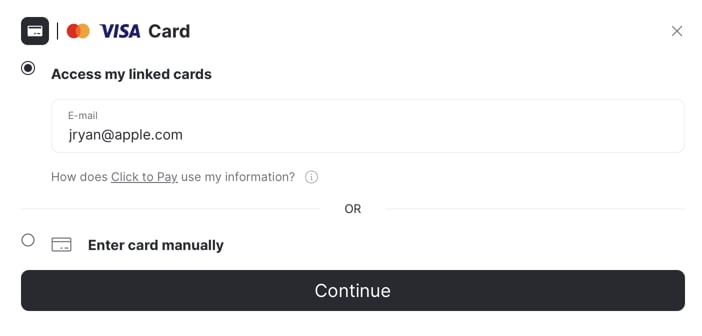 There are three different C2P UX Flow scenarios depending on user recognition:
| Scenario | State | UX Experience |
| :------------------------------------------------- | :------------------------------------------ | :----------------------------------------------------------------------------------------------------------------------------------- |
| **Scenario A: First-Time User (New)** | No C2P account exists | User enters card details + email/phone. **APM Flow**: Mandatory account creation. **Golden Flow**: Optional enrollment via checkbox. |
| **Scenario B: Recognized User (Cookies/Device)** | Account exists + valid cookie (\< 6 months) | Instant recognition - no email entry needed. Saved cards appear immediately. Fastest possible checkout (2-3 seconds). |
| **Scenario C: Recognized User (Email/Phone Only)** | Account exists but no valid cookie | User enters email address -> C2P finds account -> Sends OTP (email or SMS). After verification, saved cards appear. |
## Activation Guide
Follow the steps below based on your desired configuration:
### Option 1: Click to Pay Only (APM)
1. Request the **DPA ID** from the card network (e.g., Mastercard).
2. Add the **Click to Pay connection** in the Yuno dashboard using the DPA ID.
3. Add the **card connection** that will process these cards.
4. Define the payment method route in **Routing** and enable Click to Pay in the **Checkout Builder**.
### Option 2: Click to Pay + Passkey
*Supported on web browsers only (not supported in WebView).*
1. Request the **DPA ID**.
2. Add the **Click to Pay connection** using the DPA ID.
3. Add the **card connection** and configure the **Acquirer BIN**.
4. Request the Yuno backend team to enable the **Passkey** and **Dual Payload** flags.
5. Create checkout sessions with a `price` for Passkey to work correctly.
### Option 3: Click to Pay + Golden Flow
1. Request the **DPA ID**.
2. Add the **Click to Pay connection** using the DPA ID.
3. Add the **card connection** that will process these cards.
4. Request the Yuno backend team to enable the **Golden Flow** flag.
### Option 4: Click to Pay + Golden Flow + Passkey
*Supported on web browsers only (not supported in WebView).*
1. Request the **DPA ID**.
2. Add the **Click to Pay connection**.
3. Add the **card connection** and configure the **Acquirer BIN**.
4. Request the Yuno backend team to enable **Passkey**, **Dual Payload**, and **Golden Flow** flags.
5. Create checkout sessions with a `price` for Passkey to work correctly.
## Verification Methods
We map the authentication method used during the transaction to the `authentication_method` field:
| SRC Code | Mapped Value | Description |
| :------- | :---------------------------- | :--------------------------------------------------------------------------- |
| 01 | `3DS_ACS` | 3DS Access Control Server (= transaction was authenticated with 3DS). |
| 02 | `APP_BASED_AUTH` | App-based authentication. |
| 03 | `FEDERATED_LOGIN` | Federated login. |
| 04 | `OTP/SHARED_SECRET` | OTP or shared secret. |
| 05 | `NO_AUTHENTICATION` | No authentication performed. |
| 06 | `PROPRIETARY` | Proprietary method. |
| 07 | `FIDO2` | FIDO2 / Passkey authentication (= transaction authenticated with a passkey). |
| 08 | `SPC` | Secure Payment Confirmation. |
| 21 | `VTS_DEVICE_BINDING` | VTS device binding. |
| 22 | `VTS_CARDHOLDER_VERIFICATION` | VTS cardholder verification. |
## VTEX integration
For VTEX merchants using Click to Pay, the integration provides automatic customer creation and data mapping to streamline the checkout experience.
**Automatic customer creation:**
When customers choose Click to Pay on VTEX stores:
* The VTEX customer is automatically created in Yuno during payment initialization (if not already existing)
* All customer data from the VTEX profile is automatically mapped to Yuno and included in the checkout session
* Customer information (CVV, email, address) is pre-filled in the SDK, eliminating redundant data entry
* The checkout flow matches the streamlined experience available for non-VTEX merchants
This feature requires the **Create customer** field to be set to **Yes** in the VTEX provider configuration. For more details, see [Set up Yuno on VTEX](/docs/plugins/vtex/set-up-yuno-on-vtex) in the VTEX integration documentation.
## SDK integration (Click to Pay Passkey)
**Important**
Standard Click to Pay card flows use the existing SDK callbacks, but Passkey users must include a `callback_url` that matches the app’s deeplink scheme so the shopper returns to the app after authentication (on Android this must match the scheme configured in `AndroidManifest.xml`). For example:
```json theme={null}
{
"callback_url": "myapp://pay/ctp"
}
```
For Passkey transactions, the one-time token (OTT) never reaches the usual SDK callbacks (including `callbackOTT` on Android). Always read it from the deeplink parameters before continuing the flow.
The Yuno iOS and Android SDKs currently support Click to Pay via the Passkey flow. In both cases, the one-time token (OTT) is returned through a deeplink URL instead of the standard SDK callbacks, so your app must parse the deeplink parameters before continuing the payment.
### iOS Passkey flow
The Yuno iOS SDK supports Click to Pay with Passkey. The flow differs from standard card payments because the SDK returns the result by deeplink instead of via the usual delegate callbacks.
### Handle the one-time token (OTT) and deeplink
When a shopper completes the Click to Pay Passkey flow, the SDK sends the result through the deeplink URL instead of the `yunoCreatePayment(with token: String)` delegate method.
#### 1. Close the external browser
When your app receives the deeplink callback, immediately call `Yuno.receiveDeeplink` to let the SDK dismiss the external browser that was used for Passkey authentication.
```swift theme={null}
func application(_ app: UIApplication,
open url: URL,
options: [UIApplication.OpenURLOptionsKey : Any] = [:]) -> Bool {
Yuno.receiveDeeplink(url: url)
// Parse the URL to extract parameters
return true
}
```
#### 2. Process the deeplink URL
The deeplink query string includes the information you need to continue:
* `has_error`: Indicates an error occurred during the transaction. Handle this scenario in your app.
* `one_time_token`: Present when the transaction succeeds. Use it to create the payment.
#### 3. Create the payment
If the deeplink contains a `one_time_token`:
1. Extract the `one_time_token`.
2. Use it to create the payment with the [Create Payment endpoint](/reference/create-payment).
3. After creating the payment, call `continuePayment` in the SDK to finalize the flow.
**Important**
The OTT never reaches `yunoCreatePayment(with token: String)` for Click to Pay Passkey. Always read the token from the deeplink URL.
### Android Passkey flow
For Android, include a `callback_url` that matches your app’s deeplink scheme when creating the checkout session, add the corresponding `intent-filter` in `AndroidManifest.xml`, and handle the deeplink in both `onCreate` and `onNewIntent`. When the deeplink arrives:
1. Check `has_error` to manage cancellations or failures.
2. Extract `one_time_token` (and the optional `checkout_session`) from the URI.
3. Send the OTT to your backend to call the [Create Payment endpoint](/reference/create-payment), then invoke `continuePayment` in the SDK to resume the flow.
See the full SDK guides for detailed samples: [Android Full Checkout](/docs/sdks/full-checkout/android-payments) and [iOS Full Checkout](/docs/sdks/full-checkout/ios-payments).
There are three different C2P UX Flow scenarios depending on user recognition:
| Scenario | State | UX Experience |
| :------------------------------------------------- | :------------------------------------------ | :----------------------------------------------------------------------------------------------------------------------------------- |
| **Scenario A: First-Time User (New)** | No C2P account exists | User enters card details + email/phone. **APM Flow**: Mandatory account creation. **Golden Flow**: Optional enrollment via checkbox. |
| **Scenario B: Recognized User (Cookies/Device)** | Account exists + valid cookie (\< 6 months) | Instant recognition - no email entry needed. Saved cards appear immediately. Fastest possible checkout (2-3 seconds). |
| **Scenario C: Recognized User (Email/Phone Only)** | Account exists but no valid cookie | User enters email address -> C2P finds account -> Sends OTP (email or SMS). After verification, saved cards appear. |
## Activation Guide
Follow the steps below based on your desired configuration:
### Option 1: Click to Pay Only (APM)
1. Request the **DPA ID** from the card network (e.g., Mastercard).
2. Add the **Click to Pay connection** in the Yuno dashboard using the DPA ID.
3. Add the **card connection** that will process these cards.
4. Define the payment method route in **Routing** and enable Click to Pay in the **Checkout Builder**.
### Option 2: Click to Pay + Passkey
*Supported on web browsers only (not supported in WebView).*
1. Request the **DPA ID**.
2. Add the **Click to Pay connection** using the DPA ID.
3. Add the **card connection** and configure the **Acquirer BIN**.
4. Request the Yuno backend team to enable the **Passkey** and **Dual Payload** flags.
5. Create checkout sessions with a `price` for Passkey to work correctly.
### Option 3: Click to Pay + Golden Flow
1. Request the **DPA ID**.
2. Add the **Click to Pay connection** using the DPA ID.
3. Add the **card connection** that will process these cards.
4. Request the Yuno backend team to enable the **Golden Flow** flag.
### Option 4: Click to Pay + Golden Flow + Passkey
*Supported on web browsers only (not supported in WebView).*
1. Request the **DPA ID**.
2. Add the **Click to Pay connection**.
3. Add the **card connection** and configure the **Acquirer BIN**.
4. Request the Yuno backend team to enable **Passkey**, **Dual Payload**, and **Golden Flow** flags.
5. Create checkout sessions with a `price` for Passkey to work correctly.
## Verification Methods
We map the authentication method used during the transaction to the `authentication_method` field:
| SRC Code | Mapped Value | Description |
| :------- | :---------------------------- | :--------------------------------------------------------------------------- |
| 01 | `3DS_ACS` | 3DS Access Control Server (= transaction was authenticated with 3DS). |
| 02 | `APP_BASED_AUTH` | App-based authentication. |
| 03 | `FEDERATED_LOGIN` | Federated login. |
| 04 | `OTP/SHARED_SECRET` | OTP or shared secret. |
| 05 | `NO_AUTHENTICATION` | No authentication performed. |
| 06 | `PROPRIETARY` | Proprietary method. |
| 07 | `FIDO2` | FIDO2 / Passkey authentication (= transaction authenticated with a passkey). |
| 08 | `SPC` | Secure Payment Confirmation. |
| 21 | `VTS_DEVICE_BINDING` | VTS device binding. |
| 22 | `VTS_CARDHOLDER_VERIFICATION` | VTS cardholder verification. |
## VTEX integration
For VTEX merchants using Click to Pay, the integration provides automatic customer creation and data mapping to streamline the checkout experience.
**Automatic customer creation:**
When customers choose Click to Pay on VTEX stores:
* The VTEX customer is automatically created in Yuno during payment initialization (if not already existing)
* All customer data from the VTEX profile is automatically mapped to Yuno and included in the checkout session
* Customer information (CVV, email, address) is pre-filled in the SDK, eliminating redundant data entry
* The checkout flow matches the streamlined experience available for non-VTEX merchants
This feature requires the **Create customer** field to be set to **Yes** in the VTEX provider configuration. For more details, see [Set up Yuno on VTEX](/docs/plugins/vtex/set-up-yuno-on-vtex) in the VTEX integration documentation.
## SDK integration (Click to Pay Passkey)
**Important**
Standard Click to Pay card flows use the existing SDK callbacks, but Passkey users must include a `callback_url` that matches the app’s deeplink scheme so the shopper returns to the app after authentication (on Android this must match the scheme configured in `AndroidManifest.xml`). For example:
```json theme={null}
{
"callback_url": "myapp://pay/ctp"
}
```
For Passkey transactions, the one-time token (OTT) never reaches the usual SDK callbacks (including `callbackOTT` on Android). Always read it from the deeplink parameters before continuing the flow.
The Yuno iOS and Android SDKs currently support Click to Pay via the Passkey flow. In both cases, the one-time token (OTT) is returned through a deeplink URL instead of the standard SDK callbacks, so your app must parse the deeplink parameters before continuing the payment.
### iOS Passkey flow
The Yuno iOS SDK supports Click to Pay with Passkey. The flow differs from standard card payments because the SDK returns the result by deeplink instead of via the usual delegate callbacks.
### Handle the one-time token (OTT) and deeplink
When a shopper completes the Click to Pay Passkey flow, the SDK sends the result through the deeplink URL instead of the `yunoCreatePayment(with token: String)` delegate method.
#### 1. Close the external browser
When your app receives the deeplink callback, immediately call `Yuno.receiveDeeplink` to let the SDK dismiss the external browser that was used for Passkey authentication.
```swift theme={null}
func application(_ app: UIApplication,
open url: URL,
options: [UIApplication.OpenURLOptionsKey : Any] = [:]) -> Bool {
Yuno.receiveDeeplink(url: url)
// Parse the URL to extract parameters
return true
}
```
#### 2. Process the deeplink URL
The deeplink query string includes the information you need to continue:
* `has_error`: Indicates an error occurred during the transaction. Handle this scenario in your app.
* `one_time_token`: Present when the transaction succeeds. Use it to create the payment.
#### 3. Create the payment
If the deeplink contains a `one_time_token`:
1. Extract the `one_time_token`.
2. Use it to create the payment with the [Create Payment endpoint](/reference/create-payment).
3. After creating the payment, call `continuePayment` in the SDK to finalize the flow.
**Important**
The OTT never reaches `yunoCreatePayment(with token: String)` for Click to Pay Passkey. Always read the token from the deeplink URL.
### Android Passkey flow
For Android, include a `callback_url` that matches your app’s deeplink scheme when creating the checkout session, add the corresponding `intent-filter` in `AndroidManifest.xml`, and handle the deeplink in both `onCreate` and `onNewIntent`. When the deeplink arrives:
1. Check `has_error` to manage cancellations or failures.
2. Extract `one_time_token` (and the optional `checkout_session`) from the URI.
3. Send the OTT to your backend to call the [Create Payment endpoint](/reference/create-payment), then invoke `continuePayment` in the SDK to resume the flow.
See the full SDK guides for detailed samples: [Android Full Checkout](/docs/sdks/full-checkout/android-payments) and [iOS Full Checkout](/docs/sdks/full-checkout/ios-payments).